VortexQ8Q8Booster
New: refresh rate and HDR for every screen

Boost with proof.Restore with confidence.

Q8Booster tunes Windows for gaming and shows you every change before it happens. Each setting is written to a journal first, so one click puts your PC back exactly as it was.

  • Nothing changes until you click
  • Never touches your games
  • Restore is free forever
  • Arabic and English
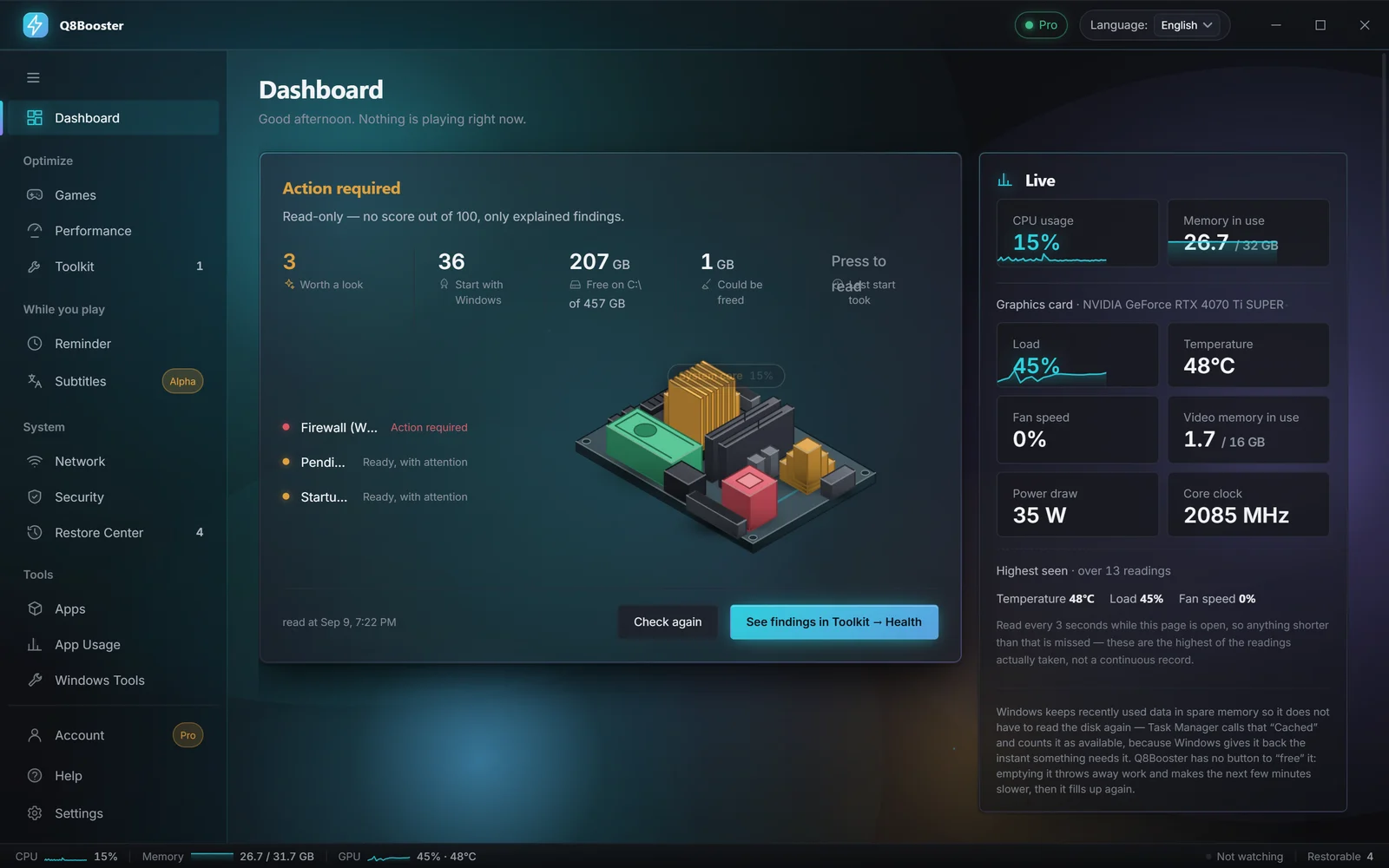
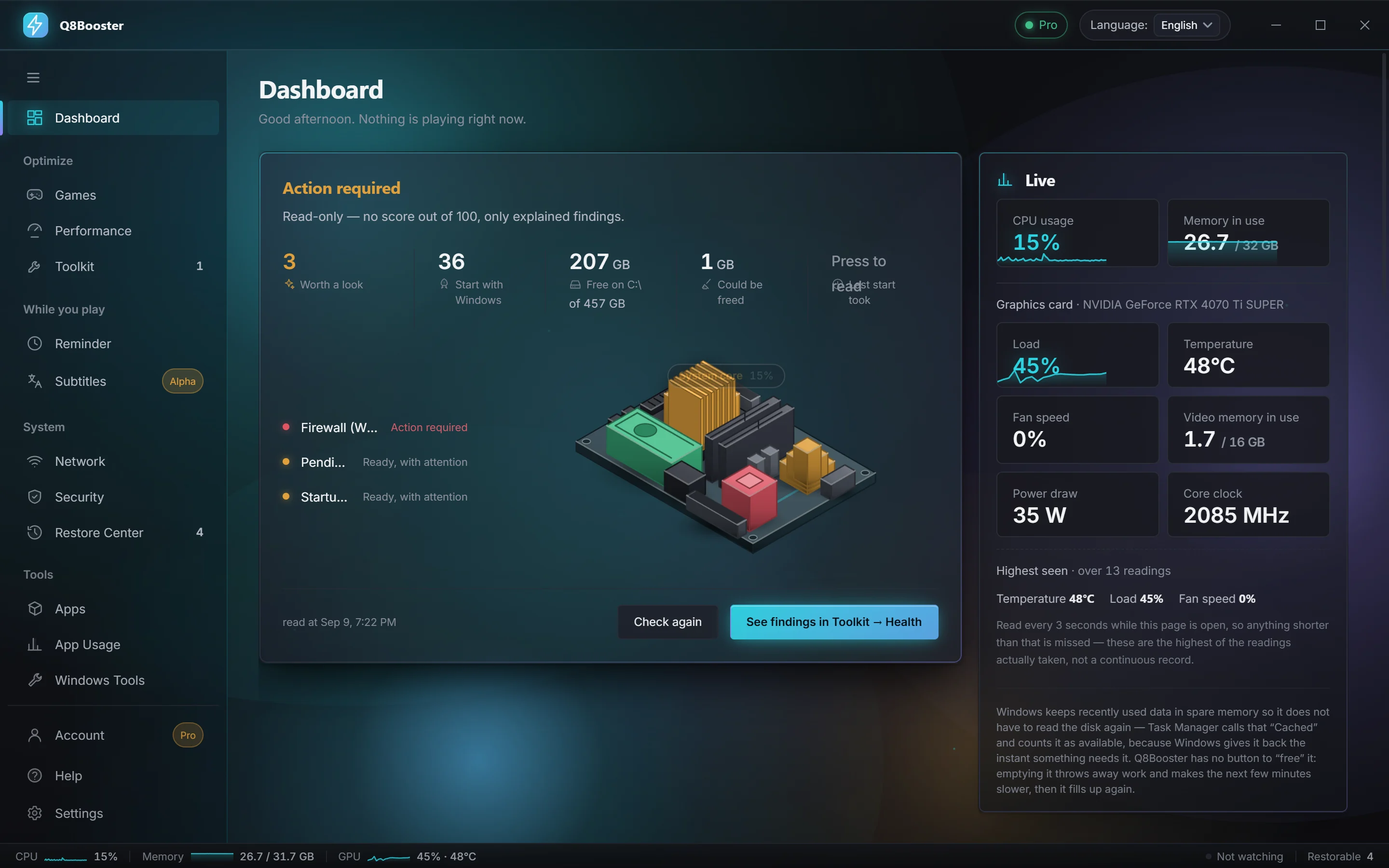
The Q8Booster Dashboard: findings from the health check, a live model of the PC and live CPU, memory and graphics card readings
16Toolkit sections for everyday Windows care
123Programs you can install in one click
7 MBInstaller. No kernel driver, no bloat
0Bytes of telemetry unless you opt in

A boost you can always take back

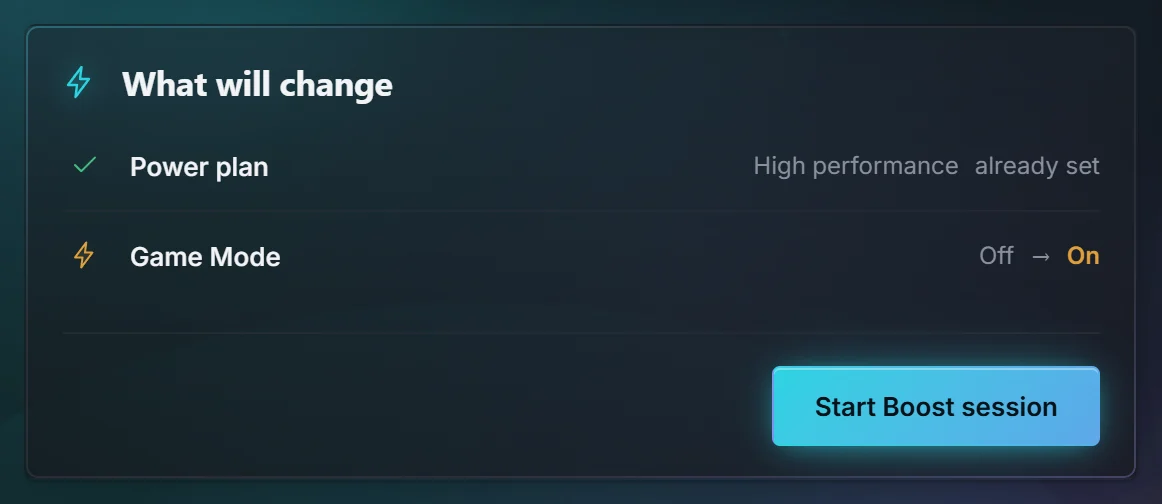
Every Safe Boost is a single transaction: previewed, applied together, and undone together. That is what makes it safe to try.

The Safe Boost preview listing each setting it will change, with its current and new value

Everything your gaming PC needs, in one app

Twelve pages of tools that Windows hides, splits up, or never built. All of it is written for gamers, in two languages.

Available

Safe Boost & Games

Your game library, and a reversible boost for every session.

  • Finds games from Steam and Epic automatically, plus any folder you add
  • Boost & Play starts the game and the boost together
  • Switches power plan and Game Mode, closes only apps you tick
  • Pin each game to the high-performance or power-saving graphics chip
The Safe Boost preview listing each setting it will change, with its current and new value
Available

Restore Center

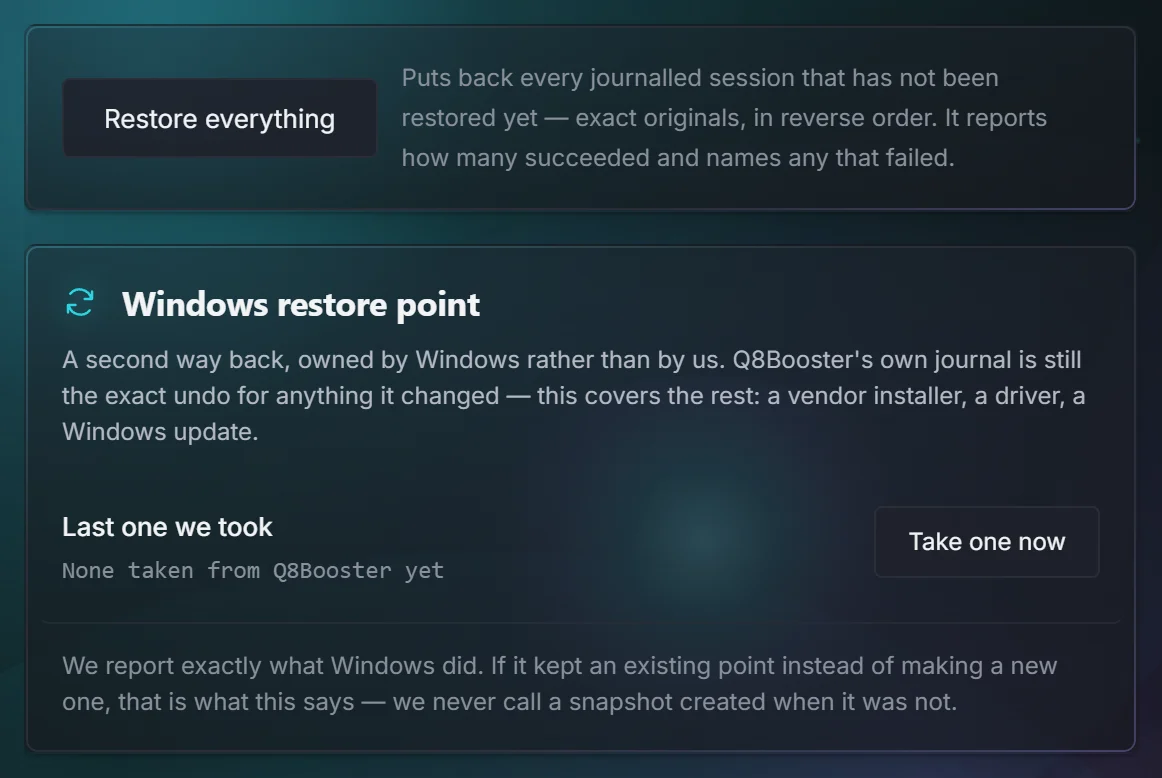
A journal of every change the app has made, with an undo button for each.

  • Undo one change or a whole session
  • Repairs changes cut short by a crash on the next launch
  • Free forever, even on an expired licence
Restore Center with Restore everything and Windows restore points
Early access

Live Arabic subtitles

English speech from any game, stream or video, turned into Arabic on a see-through band over your screen.

  • Speech recognition and translation run on your own PC. No audio ever leaves it
  • Draw a box anywhere on screen to save it, copy it, or read the text inside
  • Works over fullscreen games
Illustration
Available

Windows Toolkit

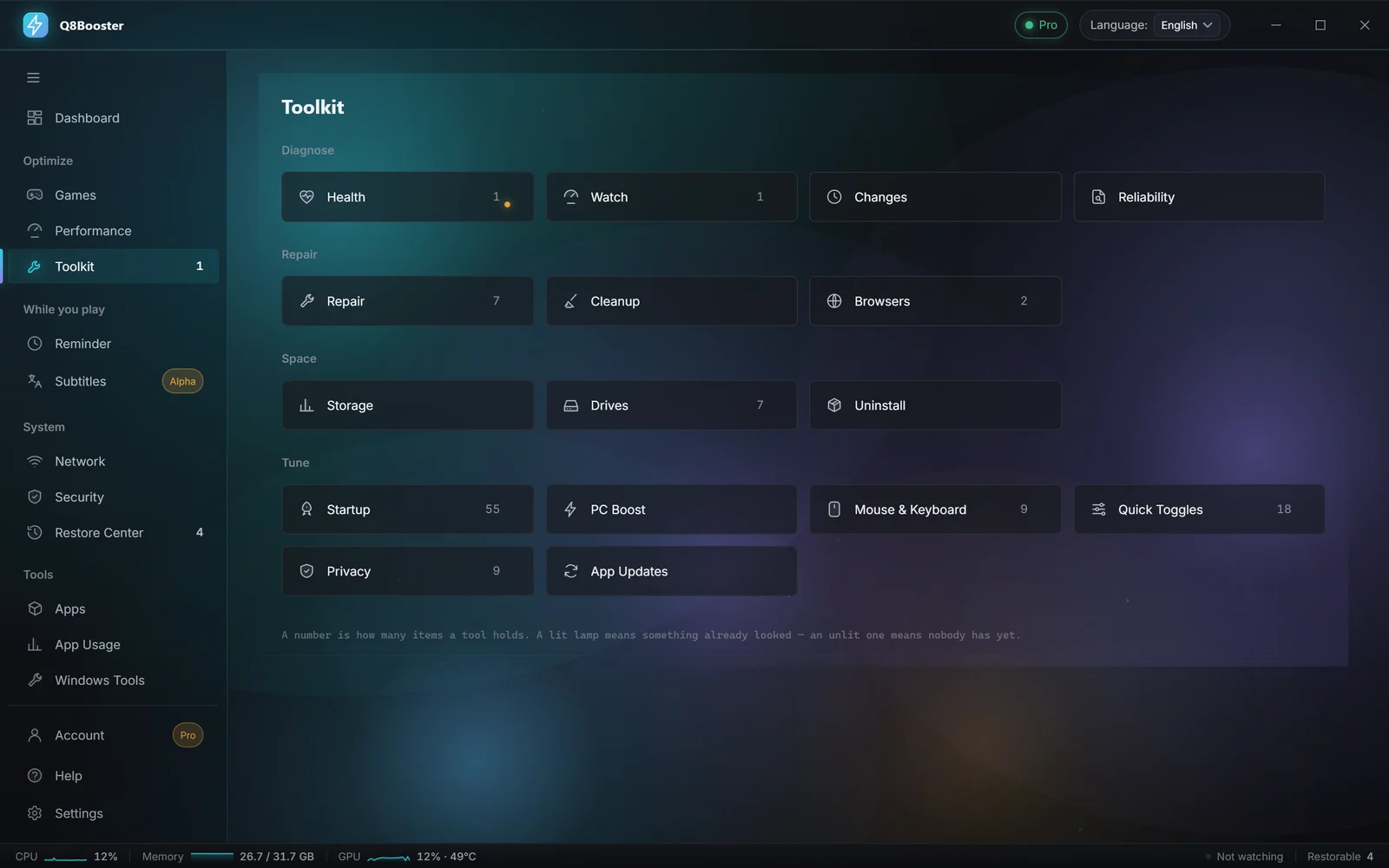
Sixteen sections of maintenance and tuning, each previewed and journaled.

  • 18 Quick Toggles, and the classic right-click menu back in one click
  • Cleanup that quarantines for 7 days instead of deleting
  • Repair tools: DNS, Explorer, icon cache, DISM and SFC
  • Uninstall that also finds and backs up the leftovers
The Windows Toolkit with its sixteen sections, from Health and Repair to Quick Toggles
Available

Network diagnostics

Find out where lag really comes from, whether it's your router, your ISP or the route.

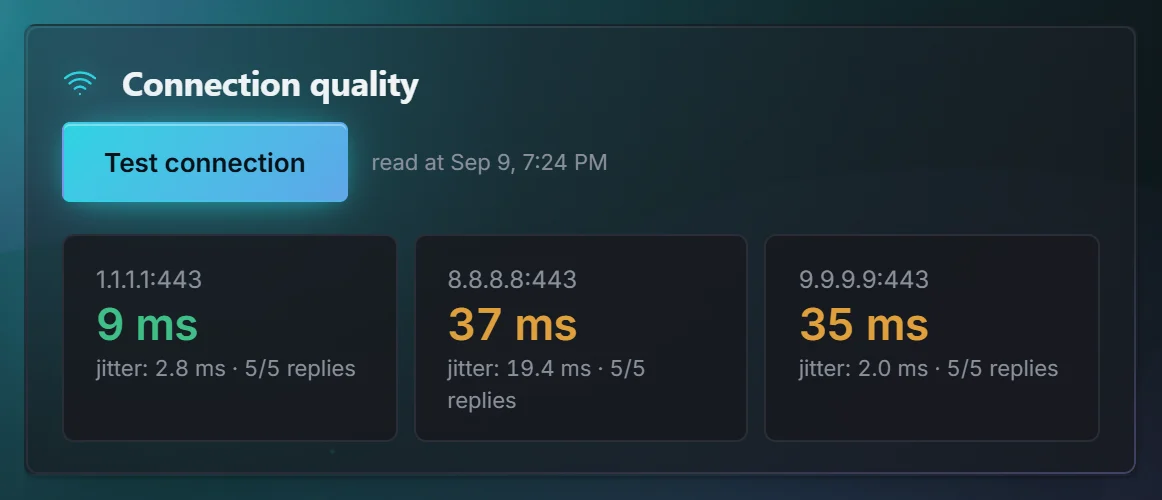
  • Latency and jitter from real round trips
  • Which of 9 server regions is really closest
  • A reversible DNS switch across 5 resolvers
  • Bufferbloat testing and a live speed monitor with Pro
Connection quality measured to three public servers, with latency, jitter and replies
Available

Health at a glance

Opens with a verdict on your PC, the worst findings first, each with the reading behind it.

  • Live CPU, memory, disk and network
  • Catches a 144 Hz screen left at 60 Hz
The Q8Booster Dashboard: findings from the health check, a live model of the PC and live CPU, memory and graphics card readings
Available

Performance

Display, graphics and page-file settings in one place, with live sensors.

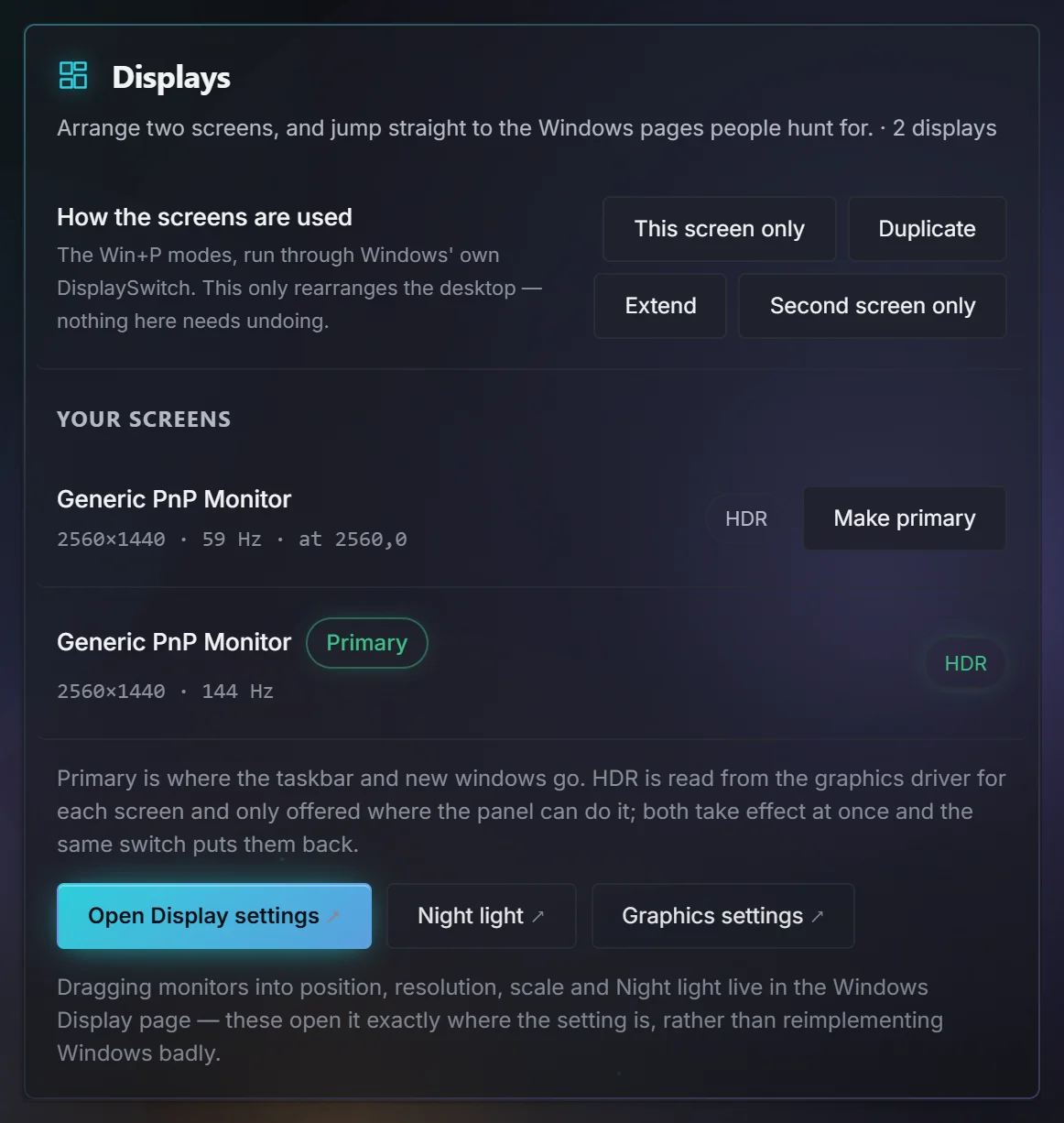
  • Refresh rate, HDR and the primary screen, for every monitor
  • Refresh-rate changes revert unless you confirm
  • Stutter Doctor: press Mark when a hitch happens and see what caused it
The Displays card showing two screens, which one is primary, and an HDR switch for each
Available

Security

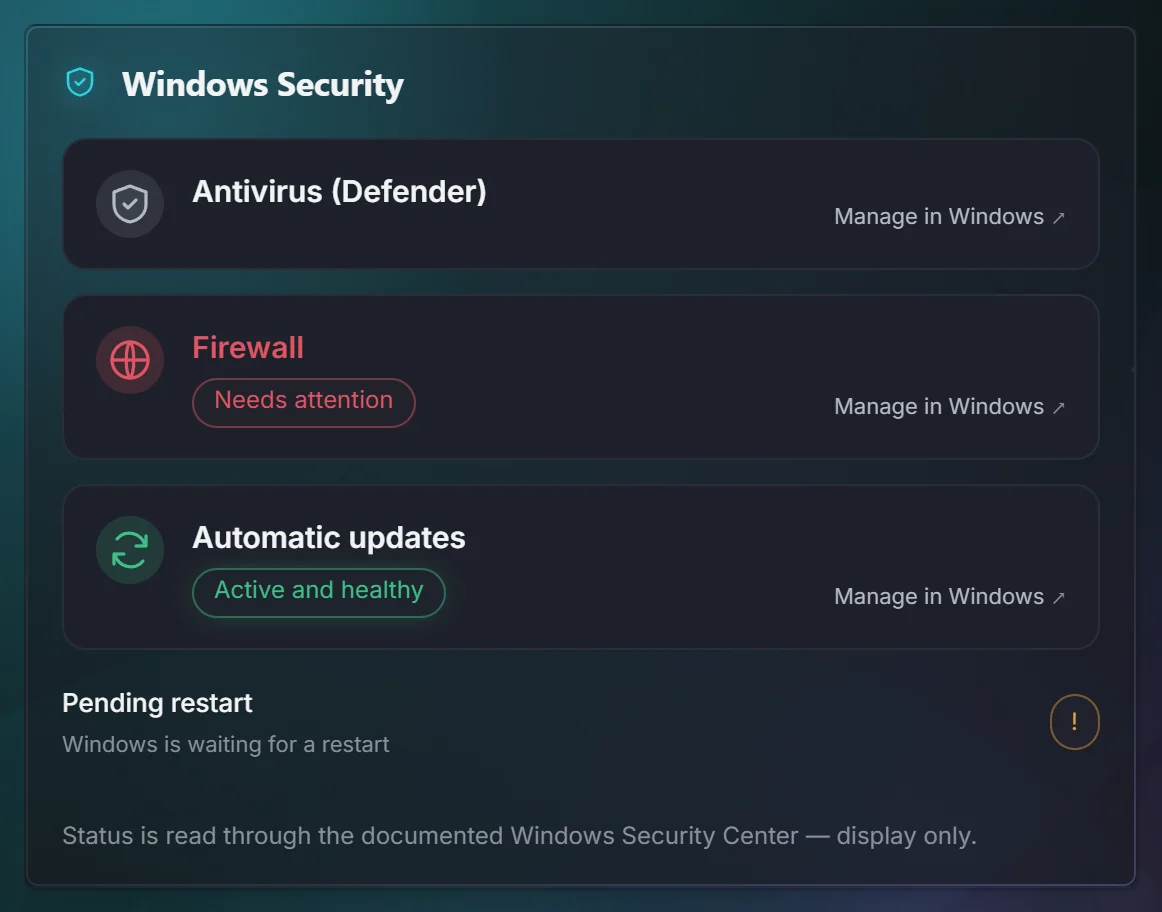
A clear read-out of how well Windows is protected, without ever weakening it.

  • Defender, Firewall, Secure Boot, TPM, memory integrity
  • Never switches a protection off. That's a rule, not a setting
Windows Security status for the antivirus, firewall and automatic updates
Available

Reminder

Prayer times, the qibla and the Hijri date, all calculated on your PC.

  • Reminders that still appear over a fullscreen game
  • Qibla from the sun, so you don't need a compass
  • Hadith from Sahih al-Bukhari and Muslim, with references
Available

Apps & updates

Install and update your software from one screen, through Windows' own winget.

  • 123 programs to install in one click, plus 18 web tools: drivers, runtimes, launchers
  • Shows your version next to the new one before anything installs
  • Private App Usage that stays on your PC

Made in Arabic, not translated into it

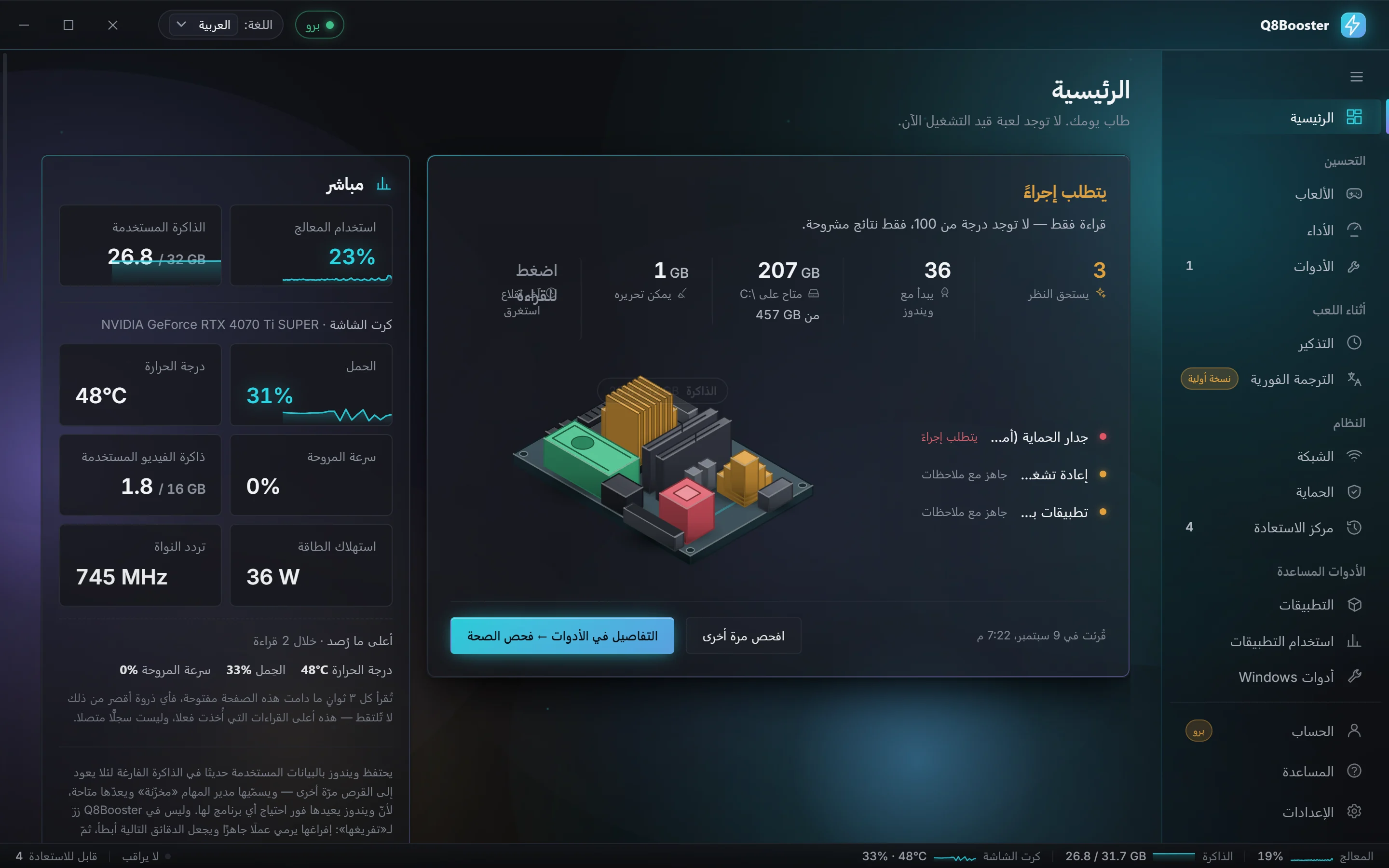
Every screen, every warning and the whole manual exist in both languages, and the Arabic layout runs right to left properly. Drag to compare the same Dashboard.

لوحة قيادة Q8Booster: نتائج فحص الصحة، ومجسّم حيّ للجهاز، وقراءات مباشرة للمعالج والذاكرة وكرت الشاشة
The Q8Booster Dashboard: findings from the health check, a live model of the PC and live CPU, memory and graphics card readings

Better every few days

Q8Booster went from 1.0 to 1.6 in nine days, and it keeps moving. New builds ship when they're ready, and the app tells you when there's one waiting.

  • Checks for updates quietly when it starts
  • Installs only when you press the button, never mid-game
  • Suggest a feature from inside the app and it goes straight to the developer
  1. v1.6.0Latest13 Sep 2026

    Every screen, and where the lag starts

    Refresh rate, HDR and the primary screen for every monitor, each game pinned to its own graphics chip, and the classic right-click menu back in one click. Network now shows whether delay starts at your router or your provider.

  2. v1.4.09 Sep 2026

    A Dashboard that shows its work

    The PC diorama lights only the part being checked, and the Health Check flags a screen running below its refresh rate, like a 144 Hz monitor left at 60 Hz. Menus are drawn by the app, so they open the right way round in Arabic.

  3. v1.3.19 Sep 2026

    Ask for a change

    Request a feature from inside the app, without sending any personal data. Every request reaches the developer.

  4. v1.2.19 Sep 2026

    Arabic that is typeset, not just mirrored

    Arabic gets its own type and spacing, Toolkit shows what changed on this PC, and Windows boot time sits on the Dashboard next to what's usual for your machine.

Built to be trusted with your PC

Most “optimisers” ask for blind faith. Q8Booster is built on three promises instead, and it keeps them in code.

See it before it happens

Every action shows the exact registry value, service state or setting as it is now and as it would be.

Measured, or not claimed

Latency, jitter, space freed: real numbers taken on your machine. No score out of 100, no invented FPS gains.

Always a way back

Each change is journaled with its original value first. Restoring is free, forever, on every licence.

Change anything on its own

No background schedule and no side effect of opening a page. A change happens when you press the button that describes it.

Touch a game

No injection, no hooks, no kernel driver, no reading a game's memory or files.

Weaken Windows security

Defender, UAC, SmartScreen and the firewall are reported on, never switched off.

Delete without a way back

Cleanup quarantines, registry residue is exported first, and the journal keeps every original value.

Send your data anywhere

Local by default. The licence check carries a key and an anonymous device hash. Telemetry is opt-in and off.

Show a number it didn't measure

No score out of 100, no invented percentage gains, no progress bar pretending to work.

Start free. Go Pro when you want more.

Everything that protects your PC or undoes a change is free, permanently. Pro adds deeper measurement and automation.

Free

0 KWD forever

No account and no email. Install it and use it.

  • Safe Boost and Boost & Play
  • All 16 Toolkit sections
  • Restore Center, including crash recovery
  • Health Check and the live Dashboard
  • Network tests and the DNS switch
  • Security read-outs and Reminder
  • Apps library and manual updates
Download free
Try Pro free for 7 days

Q8Booster Pro

3.000 KWD/30 days

about US$9.99

  • Your licence key appears on screen the moment you pay
  • 1 PC, movable to another from the app. Works offline 14 days at a time
  • Every new Pro feature included as it ships
  • Restore and safety features stay free for everyone
Other ways to pay

WAMD and PayMe, arranged over WhatsApp.

Pay by WAMD or PayMe

Start the trial from Account inside the app. No card, just an email address. One trial per PC.

Everything in Free, plus nine features that go further:

  • Loaded-latency (bufferbloat) testing
  • Live speed monitor
  • Duplicate finder for your folders
  • Deep uninstall: AppData and registry leftovers
  • App usage history across sessions
  • Scheduled app updates
  • Auto Safe Boost when a game starts
  • The Tuning Advisor
  • Reading and translating text from any part of the screen

Restoring anything Q8Booster changed stays free even if your licence expires. Your undo button is never held hostage.

Questions, answered

The straight answers people ask for before installing a tool that touches Windows.

Will this give me more FPS?

It can, but anyone who promises a number is guessing. Q8Booster cuts background contention and applies the settings Windows provides for games. How much that shows up as frames depends on your hardware and your game, so the app measures instead of promising.

Can it get my game account banned?

It never reads or writes any game's memory, files or process, and it injects no code and installs no hooks or kernel driver. Those are what anti-cheat looks for. It only changes Windows settings, with your permission.

What if something goes wrong?

Every change is journaled with its original value before it's applied, so Restore Center can put it back exactly. A change interrupted by a crash or power cut is repaired the next time the app starts. Restoring never needs a licence.

Does it disable Windows Defender or UAC?

No, and it refuses to. Switching off security to make a number look better is what makes most “optimisers” dangerous. The Security page reports on your protections and has no switch to weaken them.

How often is it updated?

Often. Version 1.0 shipped on 4 September and 1.6 on 13 September. The app checks for a new build when it starts and installs it when you press the button, never while a game is running.

What leaves my PC?

By default, only a licence check: your key and an anonymous device fingerprint. No telemetry unless you opt in. Subtitles and screen reading run on your own processor, and no audio or image leaves the machine.

Why does Windows warn me when I install it?

The installer isn't code-signed yet, so SmartScreen has no publisher record for it. Check the SHA-256 on the download page if you want certainty. The warning goes away once the certificate is in place.

Can I move my licence to another PC?

Yes. A key covers one PC at a time: release it from Account on the old PC and activate it on the new one. Settings can also export your language, appearance and game profiles.
Questions before you buy?

Ask about licences, payment, or whether it will run on your PC. You'll get a reply from the person who builds it.